9 Simple Ways To Enhance Your Classroom With Video
Nine teacher-focused video ideas (unit previews, parent updates, test prep) plus student project formats. Trust, rapport and engagement, in minutes.
It's been a long time since video was first introduced to the classroom, wheeled in on wobbly AV carts groaning with heavy CRT displays and bulky VHS recorders. Video is now a way of life for students before they utter their first word. After their Crayola masterpieces, video is often an early expressive form as the discover the world around them and find their own creative voice.
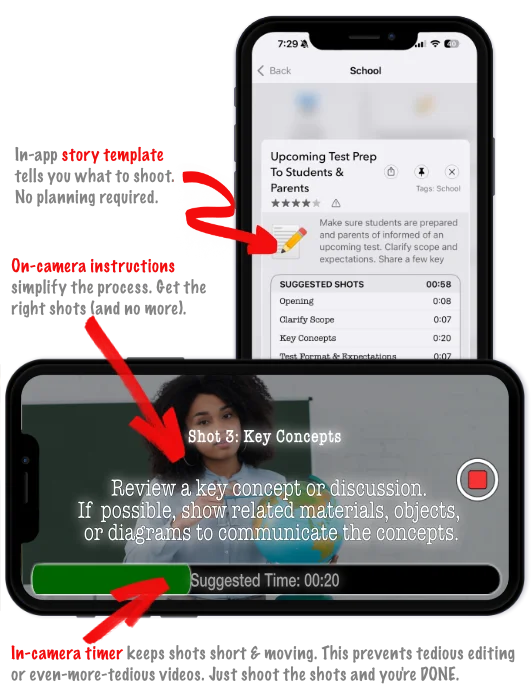
Though video is a powerful medium, it is also a tedious and difficult one to author. So one student decided to tackle this problem as a school project, and the rest of the family gradually joined in (including a former teacher and M. Ed.). They created NanoFlick, a free guided videocamera app. It's now a Silicon Valley startup in use all over the world.
The solution dramatically simplifies making everyday, even spontaneous videos. Not merely video clips, but rather complete, multi-shot videos with structure, pace and brevity.
Traditionally this would require talent, planning, technical ability and lots of time and effort. With NanoFlick, you need none of that. You start by selecting a story template, which includes a list of shots, along with instructions and durationfor each. You shoot those shots using the app, and you're done. As in done, done. Ready to share immediately. There is zero editing required.
With that simplicity, you can now leverage this technology in several innovative ways:
For Teachers: 9 Suggested Stories
- Unit Preview: provide students with a 30-second teaser video of an upcoming lesson. This would take you 1 to 2 minutes to fully produce.
- BTSN Preview: offer parents a 40-second overview of your back-to-school night program. Again, this would be no more than 3 to 4 minutes of work.
- School Year Welcome: send an engaging 20-second "welcome" video to families to start the year on a warm, inviting note. 1 to 2 minutes of effort.
- Test Preparation: provide a 1-minute preview of an upcoming test for parents and students, clarifying scope and expectations, and offering reminders of strong study and test-taking habits. 3 to 4 minutes of effort.
- Project Feedback: offer group or individualized project feedback of key projects, clarifying concepts, goals, and recommendations for re-submission or future projects. 2 to 3 minutes' effort.
- Class Update to Parents: quick updates of projects, field trips, scheduling, homework and other logisitics. Depending on your privacy policies, you can also capture key moments in the classroom to share your efforts on behalf of their kids. 3 minutes' effort.
- Concept Explainer: present a quick video that reiterates a lesson or key concept for the kids to review at home, with parents, or before tests. 4 to 5 minutes' effort.
- Weekend Thought: offer an end-of-week reflection on the week's activities and encourage the students on how to think further themselves on the topic. 1 to 2 minutes' effort.
- Full Lesson (Flipped Class): although most videos are best kept (very) short, you can use NanoFlick for a full lesson, breaking each notion down to an individual shot that you can deliver using your own commentary, imported visual clips, as well as shots of you interacting with whiteboard content or other materials. If done right, the lesson will be simple to create and reusable over the years.
With all of these, the goal is to offer warm, authentic, empathetic communication that increases trust, rapport, understanding and engagement. Video is the best medium to keep students and parents informed.
For students, engagement and retention are typically (much) higher with video, and video provides the flexibility to review and revisit to match their own pace.
Video's effectiveness was demonstrated in this 2016 study performed by CalTech professors providing video feedback on student projects. Teachers commented that video feedback was faster and more effective than handwritten, and it helped with more authentic relationships, particularly in responding to individualized needs.
Student Projects
You can also inspire and engage students with their own video projects, such as:
- Book Report
- Video Journal
- Scientific Experiment Summary & Results
- Video Essay
- Persuasive Speech
- Science Fair Journal
- Science Fair Presentation
- Share-A-Talent
- Ad for a Concept: create a video ad for any topic: sustainability, long division, learning history, conflict resolution
- Short Movie Contest: each group gets the same script/template from which they create their own version of the story.
- Show-And-Tell: kids can present grandparents, favorite activities and aspects of their lives outside the classroom.
- Fundraising Sales Pitch: grandma won't be able to resist…
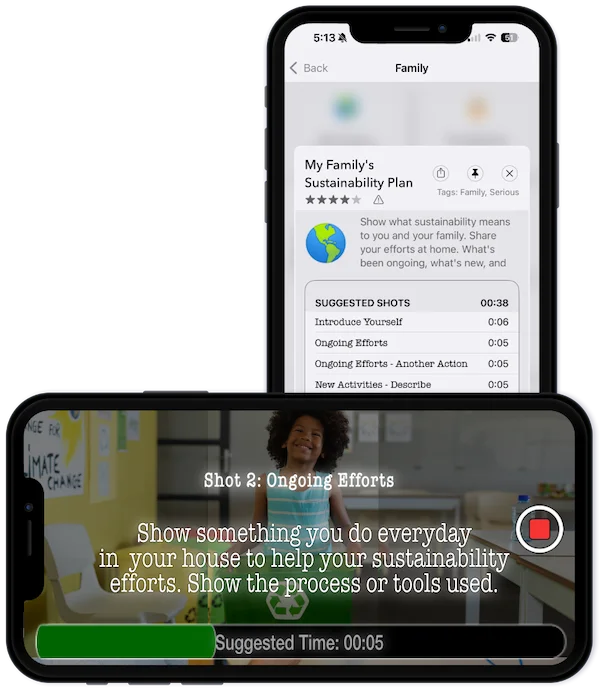
For a generation of kids who routinely turn to social media videos, creating their own is highly motivating, even in service of an unloved school topic.
Getting Started
Download the free app here on the Apple App Store.
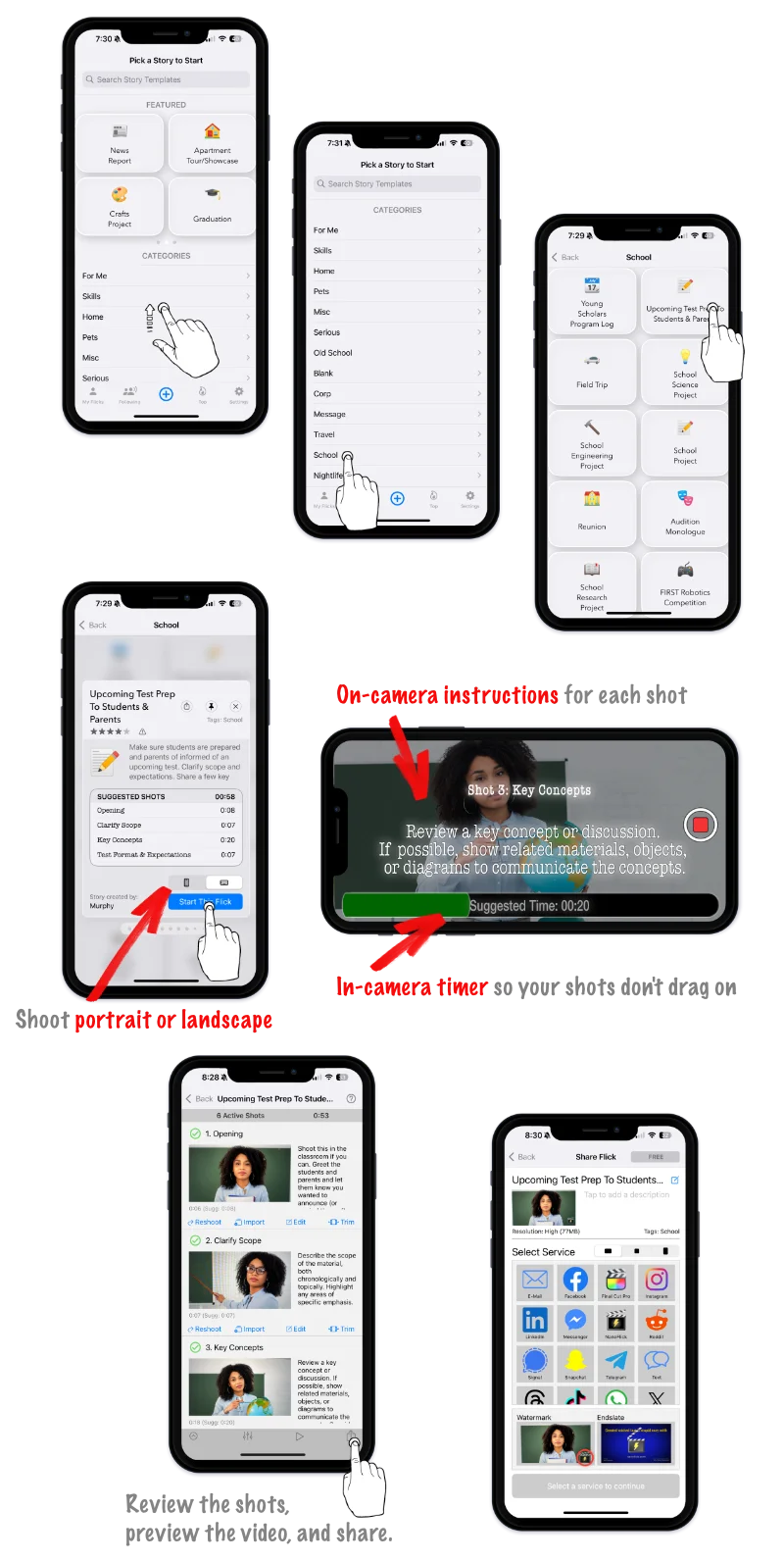
After you've started it, select the "School" category to review the available story templates and try one yourself. If you'd like to see additional story templates created, shoot us a note at feedback@nanoflick.com. You can also create your own, or customize an existing one. Learn more here.
Free Resources for All Video-Makers
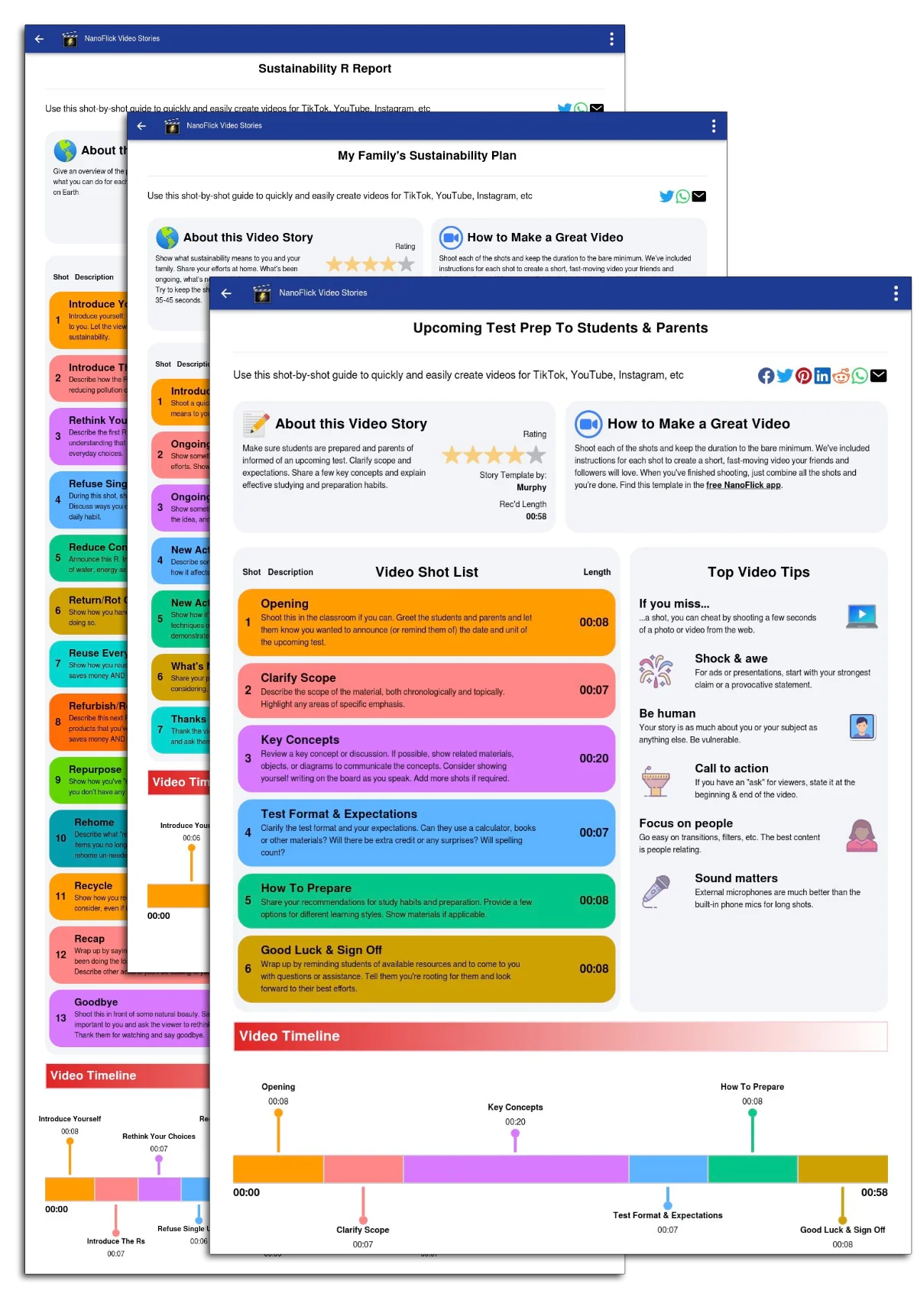
Although making videos is dramatically easier inside the NanoFlick app, our entire template library is available on the web, so students and teachers can use the outlines with any recording camera or device. Just head over to https://www.nanoflick.com/video-stories/School.
Last updated